

What Exactly Is an AI Agent?
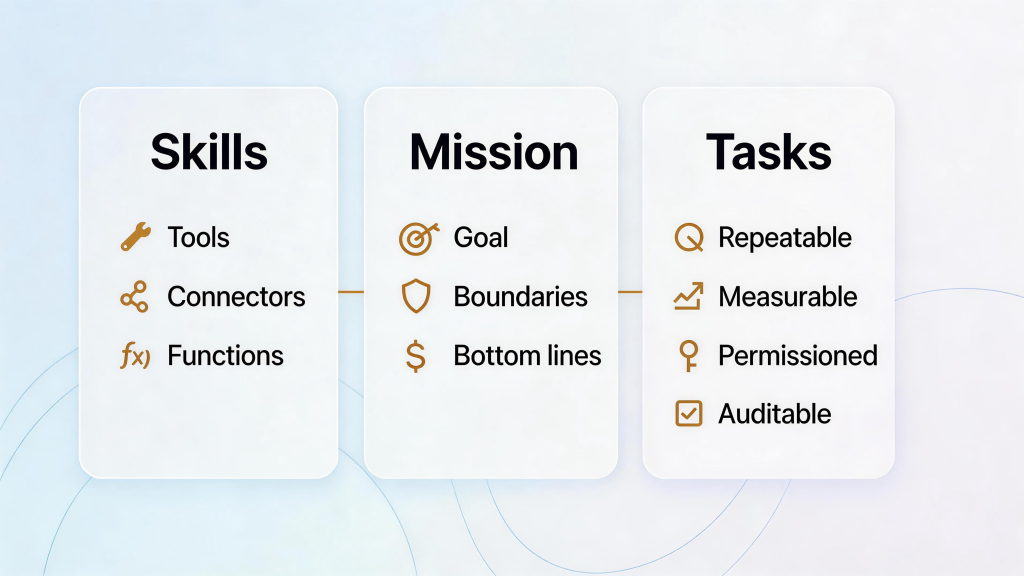
Most teams can list dozens of AI “capabilities,” but still struggle to turn them into reliable outcomes. A practical definition helps: an AI agent isn’t just a model that talks—it’s a digital worker with a Mission, Skills, and Tasks. Remove any one of those modules and you don’t get an agent; you get a demo.
Think of it like hiring staff: values and goals matter (Mission), competencies matter (Skills), but without a clear job to do (Tasks), nothing ships.
The 3 modules that turn “AI” into an AI agent
Call anything with a prompt an “agent” and the definition becomes useless. A real agent can act—trigger tools, touch systems, and complete work under an identity. For a security-oriented comparison of chatbots vs agents, see the Cloud Security Alliance’s AI Agents vs AI Chatbots: Understanding the Difference.
Here’s a business-first way to define an agent that your teams can actually implement:
Mission: the agent’s goal, boundaries, and non-negotiables.
Skills: the capabilities the agent can use (tools, connectors, functions).
Tasks: the repeatable jobs the agent is responsible for completing.
You need all three. Mission without Skills is good intent with no ability. Skills without Tasks is a “talented” agent that does nothing. Tasks without Mission is busywork that can drift away from what you actually want.
Module 1: Mission — goals, principles, and bottom lines
Mission is the “soul” of the agent: what it’s trying to achieve, what it must never do, and how it should behave when the world is messy.
In practice, Mission becomes a small set of operational principles you can test and audit:
Goal clarity
Define what “done” means in business terms (e.g., “close the books daily with exceptions surfaced by 10am,” or “publish a compliant invoice within 60 seconds of sale”).
Boundaries and bottom lines
Put guardrails on data, money, and systems: which entities/clients it can touch, which fields it may read/write, and what actions are always blocked.
Compliance can live here as one example of a bottom line (privacy, tax rules, retention), but it’s not the only one—think brand ethics, fraud thresholds, and separation of duties.
Authority model (how the agent is allowed to act)
Least-privilege scopes: give the agent the smallest set of “keys” needed for its job.
Role-based approvals: mirror human controls—some actions require a second set of eyes.
Session boundaries: use service accounts, temporary tokens, and key rotation.
Accountability
Keep tamper-evident logs of instructions, tool calls, data touched, and outcomes so humans can review what happened and why.
If you can’t explain an agent’s Mission in a few sentences, it’s usually a sign the Tasks are unclear or the authority model is too broad.
Module 2: Skills — what the agent can do
Skills are the agent’s capabilities: the tools, connectors, and functions it can reliably use. The key is not to chase “100 skills,” but to pick the few that actually support the Mission and the Tasks.
Here are three high-value skill patterns that show up across finance and operations (SME, enterprise, and public sector alike):
Dual‑mode data capture (structured POS + unstructured receipts)
Parse POS exports, invoices, and receipts with high accuracy. Apply confidence thresholds and route low‑confidence fields to human review.
Collect only what’s necessary. This both reduces error and aligns with data minimization.
Zero‑code ERP integration (Odoo‑first, adaptable elsewhere)
Use prebuilt connectors to post vendor bills, customer invoices, and journal entries without writing code. Odoo’s docs on Digitize Invoices/Bills and Bank Synchronization show the pattern.
Enforce role‑based approvals before posting—especially for higher‑risk actions like tax changes or payment releases.
Reconciliation and exception routing
Match transactions from bank feeds to invoices automatically. When mismatches occur, escalate with context: “Amount differs by 12.50; vendor name mismatch; invoice date outside tolerance.”
Provide a clean exception queue with audit links and suggested next steps, keeping humans in the loop where judgment is needed.
These skills make agent-driven automation tangible and repeatable—without turning every department into an IT project.
Module 3: Tasks — the jobs the agent is accountable for
Tasks are where agents become real. You can give an agent perfect Skills, but if it has no defined Tasks, it’s like hiring a highly trained employee and never assigning them a role.
A good Task is:
Repeatable (same inputs/outputs)
Measurable (clear success criteria)
Permissioned (aligned to Mission boundaries)
Auditable (you can trace what happened)
To make this concrete, we’ll use a common finance workflow that appears in many organizations: auto‑ingest receipts/invoices → validate key fields → post to an ERP (Odoo used here as an example) → reconcile the bank feed.
Step 0 — Preconditions (identity and roles)
Map identities: owner, manager, clerk, accountant, agent‑service account.
Define scopes: which store/entity ledgers, which bank accounts, which vendors.
Set thresholds and approvals: e.g., postings above $1,000 need owner approval; tax field edits require accountant sign‑off.
Step 1 — Capture (dual‑mode)
Structured: Pull POS Z‑reports or API exports daily; capture date, gross, net, tax, tenders.
Unstructured: OCR supplier invoices/receipts; extract vendor ID, dates, totals, tax IDs (VAT/RFC/CNPJ), line items where needed.
Quality gates: If OCR confidence on totals or VAT ID < 0.95, route to human review.
Step 2 — Validate (GEO‑aware checks)
EU/UK: Validate counterpart VAT numbers and formats; document purpose for processing and apply the appropriate retention window. For VAT context and official tools, see the European Commission VAT for businesses portal.
Brazil: If handling NF‑e, ensure schema compliance, proper signing with A1/A3 certificates, and manage events like cancellations. Refer to SEFAZ technical notes for NF‑e.
Mexico: For CFDI 4.0, confirm required attributes per Anexo 20 and validate via an authorized PAC. See SAT: Anexo 20 and CFDI guidance for catalogs/specs and stamping requirements.
Universal: Detect duplicates, mismatched totals, out‑of‑period dates, and vendor anomalies. Flag exceptions early.
Step 3 — Authorize & post (least‑privilege in action)
The agent uses its own service account with a posting role restricted to the scoped ledger.
For postings exceeding thresholds or with tax edits, the agent requests an approval from the designated role; only after approval does it post to Odoo via a zero‑code connector.
Every step is logged: who/what/when, including data fields touched and the final journal entry link.
Step 4 — Reconcile (bank feed → ledger)
Sync bank feeds and apply reconciliation rules. Auto‑match when confidence is high. Odoo’s Bank Reconciliation shows configuration patterns.
Route exceptions with context: “Reference missing; amount off by 2.10; date outside 7‑day window.” Include one‑click actions for accept, reclassify, or request info.
Step 5 — Monitor & audit
Generate daily exception and posting summaries. Maintain tamper‑evident logs for regulator or auditor review.
For EU high‑risk automations, evaluate whether a DPIA is warranted (see EC/EDPB guidance). For California, monitor CPRA/ADMT rule status and prepare risk assessments where applicable via the CPPA regulations hub.
Example implementation (neutral): An organization can combine an Odoo‑first setup with a governed capture‑to‑posting pipeline. Solutions like AInvoiceX may be used in such a workflow to support dual‑mode capture, regional invoice handling, and ERP handoff within least‑privilege boundaries. Choose connectors and configurations that fit your region, industry, and approval policies.
A quick note on governance and compliance
Different organizations will encode different bottom lines into an agent’s Mission—privacy, procurement rules, tax regulations, security policies, brand standards, and more. The important part is that those bottom lines are explicit, testable, and enforced through scopes, approvals, and logs (not just written in a policy doc).
If you need a credible starting reference for agent autonomy and identity controls, the Cloud Security Alliance’s Agentic AI Identity & Access Management is a useful overview.
How this redefinition helps small teams and large organizations
Single-entity operations: Minimal setup—one agent scoped to one ledger, daily capture, sensible thresholds (e.g., >$1,000 approval), and monthly reconciliation reports.
Multi-entity operations: Separate scopes per subsidiary/client/program; agent service accounts per entity; centralized approvals; standardized validation templates per region. This keeps data isolated while scaling shared-services capacity.
The new standard in a sentence
An AI agent is a digital worker with a Mission (why and boundaries), Skills (capabilities), and Tasks (accountable jobs)—and it needs all three to create reliable outcomes.
What’s one Mission + Skills + Tasks bundle you could pilot in one team this quarter?
Example: AI-ForceX’s IDP Agent as a Mission–Skills–Tasks agent (bank statement analysis)
Here’s a concrete way to map the framework to a real workflow using AI-ForceX: a bank statement extraction and analysis agent that reads PDFs or even photos of statements.
Mission
Convert bank statements into accurate, structured transactions for downstream reporting.
Respect organizational bottom lines (e.g., only process approved accounts/clients and avoid storing raw documents longer than required).
Skills
Document understanding for PDF statements and photos (OCR + layout-aware extraction).
Transaction parsing and normalization (dates, amounts, currencies, merchant descriptors).
Anomaly detection and lightweight analysis (missing pages, duplicates, outliers, unexpected fees).
Tasks
A scheduled run (e.g., a nightly cron job) ingests new statements from a defined folder, extracts transactions, validates totals, and outputs a clean file/table for your finance pipeline.
Exceptions (low-confidence fields, inconsistent balances, unreadable images) are routed to a review queue with traceable evidence.
This is the practical test: you can read the Mission in seconds, list the Skills on one screen, and measure whether the Tasks complete reliably week after week.
FAQ
Q1: What makes something an “AI agent” instead of just an AI tool?
An AI agent has Mission + Skills + Tasks. Mission defines the goal and boundaries, Skills define what it can do through approved tools, and Tasks define the repeatable jobs it’s accountable for. Without Tasks, it’s a capability demo. Without Mission, it can drift. Without Skills, it can’t execute.
Q2: What’s the fastest way to start with agent tasks without creating chaos?
Start with one narrow, high-frequency task (e.g., capture → validate → draft/post → reconcile), write explicit success criteria, and keep permissions tight. Add approvals for high-impact actions (money, tax fields, master data), and log inputs/outputs so a human can review exceptions.
Q3: How do I choose the right “Skills” for an agent?
Pick Skills that directly support the Tasks: the few connectors, APIs, and functions required to complete the workflow end-to-end. Prefer Skills that are stable, permissionable, and observable (good error handling + logging). If a Skill can’t be scoped safely, don’t give it to the agent.
Q4: Do I need a specific ERP or stack to use this framework?
No. Mission–Skills–Tasks is platform-agnostic. Whether you use an ERP, a finance suite, or custom systems, the pattern is the same: define the Mission, connect the minimum Skills needed, and assign concrete Tasks with measurable outcomes.
Disclaimer: This article provides general information and is not legal advice. Privacy and tax regulations evolve; verify requirements with official sources and consult qualified advisors before implementation.